Code Smarter.
Ship Faster.
The AI-powered workspace that reads your files, runs your code, connects your tools — and works the way you do.
A real workspace — not just a chat window
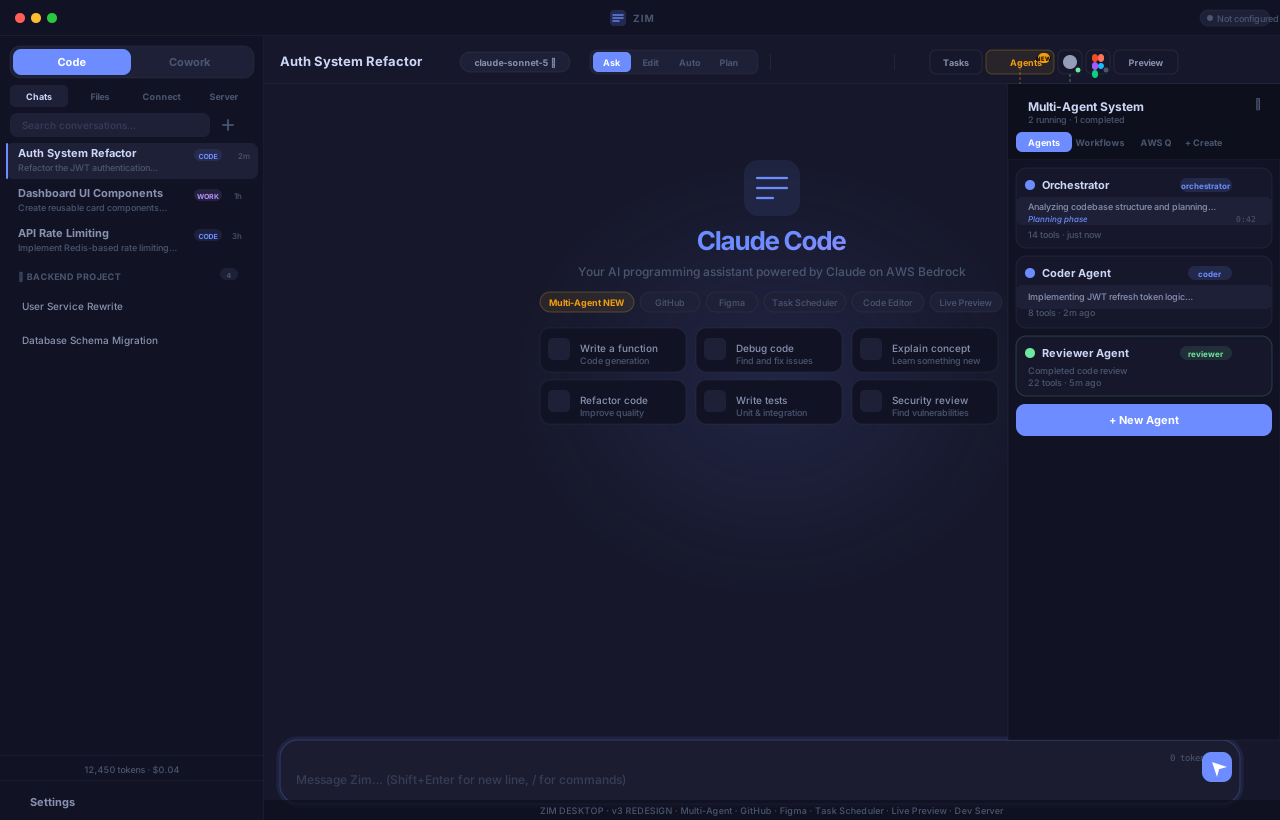
Code Mode · Cowork Mode · Multi-Agent System · GitHub · Figma · Live Preview
Your AI tools are fragmented
Chat tools can't touch your code
ChatGPT and Claude.ai are great for conversation — but they can't open your files, run your tests, or push to GitHub.
IDE plugins are siloed
GitHub Copilot and Cursor live inside your editor — but they don't know about your Figma designs, your team's conversations, or your GitHub issues.
"Vibe coding" has no guardrails
Prompting AI to generate entire apps is exciting — but without structure, reviews, or tests, you end up with code you can't maintain.
💡 Zim brings it all together — one platform where AI understands your full context: your files, your tools, your team, and your workflow.
Meet Zim — your AI dev workspace
Zim is a full-featured AI development platform. It's not just a chatbot — it's an agent that can read and write your files, run commands in a terminal, preview your app, and collaborate with your team — all in one place.
Use it in your browser or as a native desktop app — with offline support.
Claude reads, writes, edits files and runs shell commands — autonomously.
GitHub, Figma, terminal, and live preview — all wired together.
Real-time collaboration, shared projects, live cursors, and team chat.
Two modes. One platform.
- 📂Full file system access — reads, writes, edits your entire codebase
- 💻Integrated terminal — runs commands, installs packages, runs tests
- 🌐Live preview — start your dev server and see it inline
- 🤖Agentic loops — up to 40 iterations to complete complex tasks
- 💡Brainstorm & plan — architecture decisions, feature specs, roadmaps
- 📝Write & review — docs, PRDs, README files, code reviews
- 📤Export conversations — save as Markdown or JSON
- 🔄Sync across devices — conversations available everywhere
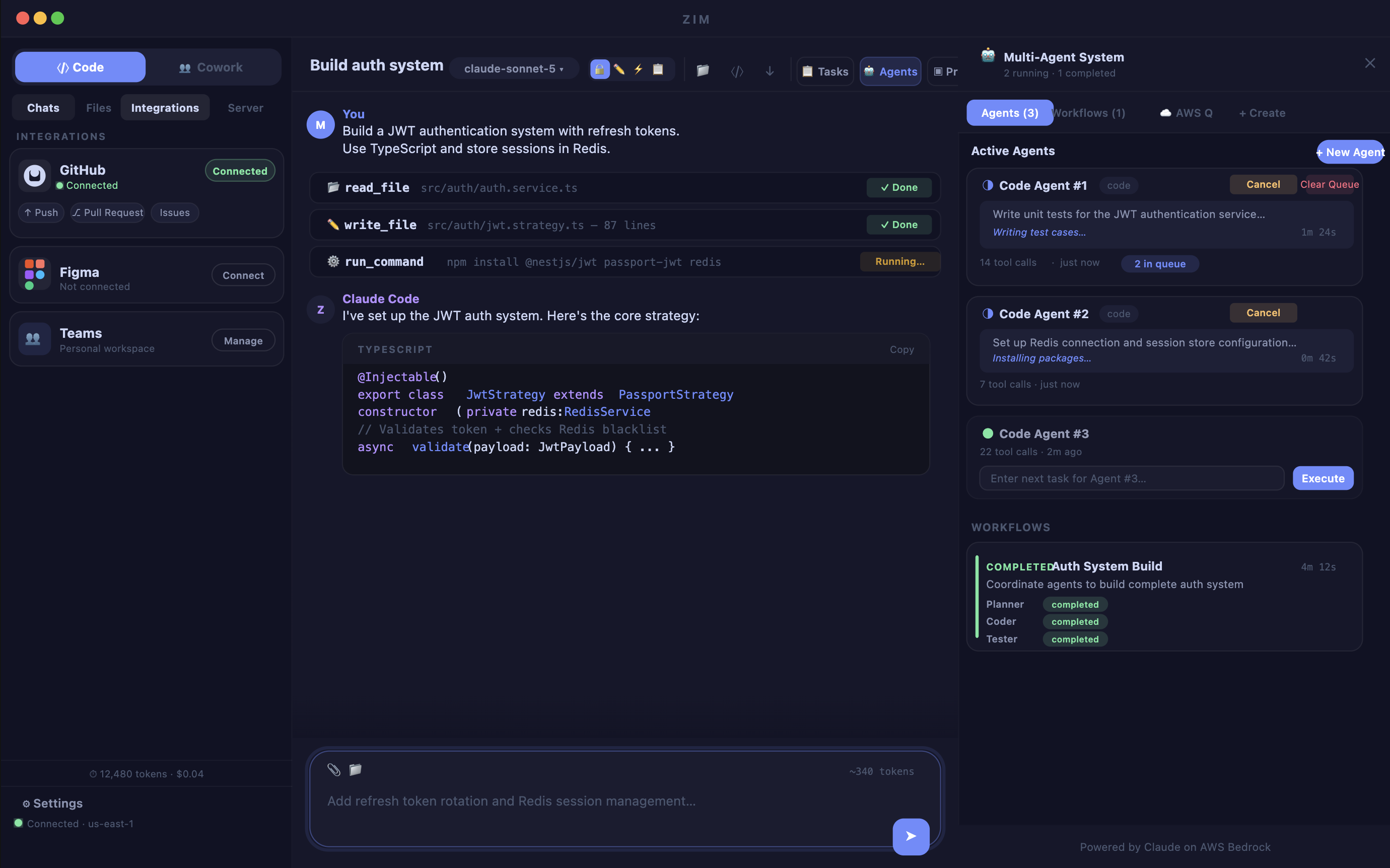
A whole team of AI agents
For complex tasks, Zim can spin up multiple specialized agents working together — just like a real dev team.
Your tools, connected
- ↑Push & pull code directly from Zim
- 🔀Create and review Pull Requests
- 🐛Create and manage Issues
- 🤖AI agent uses GitHub tools natively
- 🎨Extract design tokens (colors, fonts, spacing)
- 📐Export assets as PNG or SVG
- ⚡AI generates React, Vue, or HTML from designs
- 💬Read Figma comments for context
Zim vs. The Alternatives
How does Zim stack up against the tools developers use today?
Core Experience
| Feature | Claude Code | Cursor | Replit | Copilot | Vibe Coding | Zim ✦ |
|---|---|---|---|---|---|---|
| Web App (browser-based) | ✗ | ✗ | ✓ | ✗ | Varies | ✓ |
| Desktop App (native) | CLI only | ✓ | ✗ | Plugin | ✗ | ✓ |
| Offline / Local-First | ✓ | ✓ | ✗ | ✓ | ✗ | ✓ |
| AI Chat Interface | ✓ | ✓ | ✓ | Limited | ✓ | ✓ |
| Code Mode + Collaboration Mode | ✗ | ✗ | ✗ | ✗ | ✗ | ✓ |
| Cost / Token Tracking | ✗ | Sub | Sub | Sub | ✗ | ✓ Real-time |
| Custom System Prompts | CLAUDE.md | .cursorrules | ✗ | ✗ | ✗ | ✓ Per-mode UI |
Agent & Coding Power
| Capability | Claude Code | Cursor | Replit | Copilot | Vibe Coding | Zim ✦ |
|---|---|---|---|---|---|---|
| File System Read/Write | ✓ | ✓ | ✓ | Edits only | Varies | ✓ Full |
| Integrated Terminal | ✓ | ✓ | ✓ | ✗ | ✗ | ✓ |
| Live Dev Server Preview | ✗ | External | ✓ | ✗ | Varies | ✓ Inline |
| Agentic Tool-Use Loops | ✓ | Limited | Limited | ✗ | Varies | ✓ 40 loops |
| Multi-Agent Orchestration | ✗ | ✗ | ✗ | ✗ | ✗ | ✓ 4 agents |
| Web Fetch (live docs) | ✓ | Limited | ✗ | ✗ | ✗ | ✓ |
| Automated Test Writing | Manual | Manual | ✗ | Suggestions | ✗ | ✓ Tester agent |
Integrations & Team Features
| Capability | Claude Code | Cursor | Replit | Copilot | Vibe Coding | Zim ✦ |
|---|---|---|---|---|---|---|
| GitHub Push / Pull / PRs | ✓ CLI | Via Git | Import only | ✓ Native | ✗ | ✓ Full UI |
| GitHub Issues Management | ✗ | ✗ | ✗ | ✗ | ✗ | ✓ |
| Figma Design-to-Code | ✗ | ✗ | ✗ | ✗ | ✗ | ✓ Full pipeline |
| Real-Time Team Collaboration | ✗ | ✗ | Multiplayer | ✗ | ✗ | ✓ Live cursors |
| Team & Project Management | ✗ | ✗ | Teams plan | Enterprise | ✗ | ✓ Full RBAC |
| Conversation Sync (Web ↔ Desktop) | ✗ | ✗ | ✗ | ✗ | ✗ | ✓ |
| Data Privacy (your AWS infra) | Local only | ✗ | ✗ | ✗ | ✗ | ✓ Your AWS |
Zim vs. Vibe Coding
"Vibe coding," prompting AI to generate entire apps, is exciting. But it has real limitations. Zim gives you the speed of vibe coding with the structure of professional development.
- ⚡Fast to start — describe what you want and get code
- ❓Code you don't understand, hard to debug or extend
- 🔒No version control — changes are hard to track or revert
- 🧪No tests — you don't know if it actually works correctly
- 👤Solo only — no way to collaborate with a team
- ⚡Just as fast — describe tasks in plain language
- 👁️See every change — agent shows you exactly what it edits
- 🐙GitHub built-in — commit, branch, and PR directly from Zim
- 🧪Tester agent — automatically writes and runs tests
- 👥Team-ready — real-time collab, shared projects, RBAC
Why developers choose Zim
Claude Code is powerful but CLI-only. Zim adds a full web + desktop UI, Figma, team collab, and GitHub management — without losing any agent power.
Cursor is great for solo coding. Zim adds Figma design-to-code, multi-agent orchestration, team collaboration, and works in the browser — no editor install needed.
Replit is great for quick prototypes. Zim works with your existing codebase, connects to your GitHub, and gives you a desktop app — not a locked-in cloud environment.
Copilot is a great autocomplete tool. Zim is a full agent that plans, builds, tests, and ships, not just suggesting the next line of code.
Vibe coding is fast but unstructured. Zim gives you the same speed with version control, tests, code reviews, and team collaboration so you can actually ship and maintain what you build.
Your whole dev workflow.
One platform.
AI agent coding · Figma design-to-code · GitHub integration
Multi-agent orchestration · Real-time team collaboration